Members & roles
Every channel has members, and each member has a role in that channel.
Roles are per channel — you might own #design and be a plain member of
#random.
The roles
| Role | What it's for |
|---|---|
| Owner | The person who created the channel. Full control, including archiving. Exactly one per channel. |
| Admin | A trusted helper who can manage members, settings, and moderate. |
| Member | Everyone else in the channel — full read and write. |
Who can do what
| Owner | Admin | Member | |
|---|---|---|---|
| Read the channel | ✅ | ✅ | ✅ |
| Post, reply, attach, draw | ✅ | ✅ | ✅ |
| Edit / delete your own messages | ✅ | ✅ | ✅ |
| Delete anyone's messages (moderate) | ✅ | ✅ | — |
| Add / remove members, set roles | ✅ | ✅ | — |
| Rename, set topic & settings | ✅ | ✅ | — |
| Archive / unarchive | ✅ | — | — |
The same rules govern whiteboards: posting lets you draw, you can always change your own shapes, and moderators (owner/admin) can change anyone's or clear the board.
Managing members
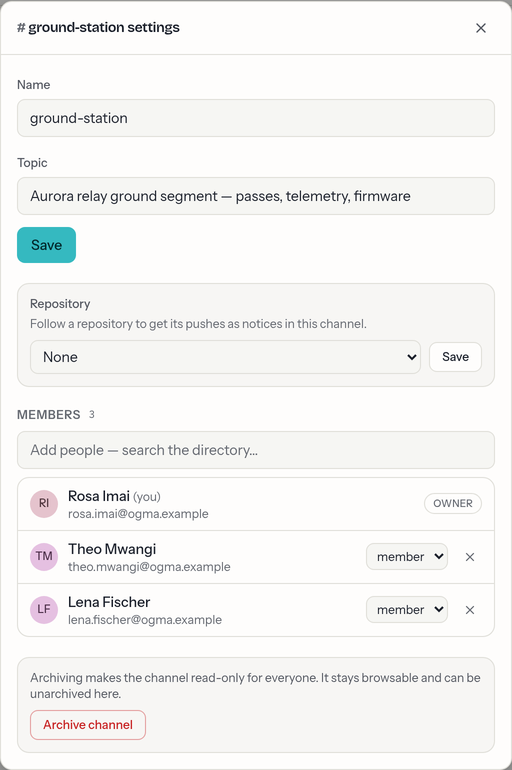
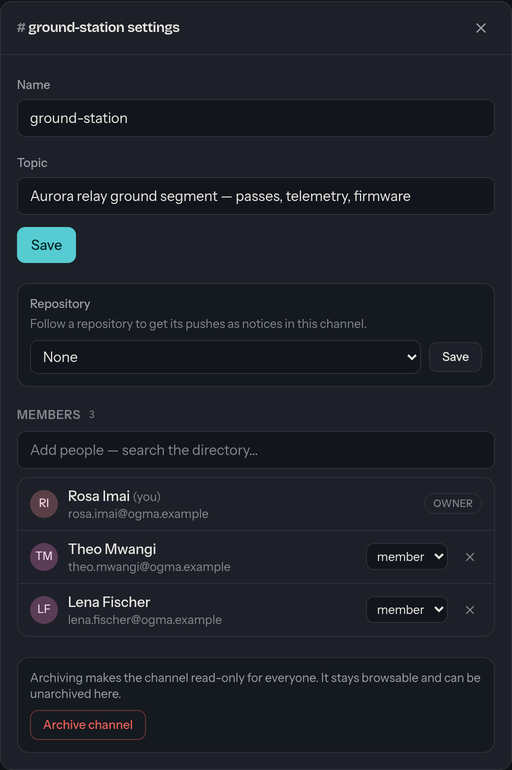
Owners and admins manage a channel's people from channel settings:
- Add someone to a private channel (public channels people join themselves — see Channels).
- Remove a member.
- Change a role between Admin and Member.
A couple of guardrails:
- Owner isn't a role you can assign — there's always exactly one, and ownership can't be transferred yet. So the owner can't be removed or demoted, and can't leave the channel.
Direct messages
Direct messages have no roles to manage — both people are equal members, and there's nothing to configure.
Workspace administrators
Someone with an administrator account for your whole ogma can act in public and private channels for support and moderation, even without being a member. This never applies to direct messages — those stay strictly between their two people.